DeadlinesE-Invoicing by Dec 31, 20262026 Computerized Books in ORUS by Jan 30, 2027E-Invoicing Dec 31 · ORUS Jan 30

Check Readiness
TechNext

Odoo Helpdesk in Singapore & the Philippines

Emails, web forms and chats become tickets, tracked against service targets, with answers kept in a knowledge base. We set up your teams, stages and SLAs and train your agents.

Odoo Ready Partner

Works withPlanningAppointmentsProjectTimesheets

Odoo Helpdesk in one paragraph

Odoo Helpdesk: tickets, SLAs and knowledge base. TechNext, an Odoo Ready Partner headquartered in Singapore with teams in the Philippines and Vietnam, sets it up on a staging copy of your database, migrates your data, trains the people who use it and supports it after go-live.

Odoo 20 uses AI to find similar tickets and suggest answers, filters the tickets still waiting on a reply, and can email the customer a reminder before a ticket closes automatically. What changed in Odoo 20.

See it on my data How we set it up

How a ticket moves through Odoo Helpdesk.

Sample tickets run through Odoo Helpdesk the way TechNext sets it up: 5 states, the exceptions and loops that really happen, and the hand-offs into Inventory, Invoicing and Knowledge. Hover a state to see what happens there.

Odoo Helpdesk · ticket lifecycleSample records · 5 states · 3 hand-offs
In progress
0
Completed
0
Exceptions
0
Hand-offs
0
  1. NewEmail, form, chat or phone
  2. In progressAssigned by rule
  3. On holdWaiting on the customer
  4. SolvedAnswer or fix sent
  5. RatedCustomer rates the reply

Exceptions and loops

  • SLA at risk: escalated
  • Reopened by the customer

What TechNext configures

  • SLA policies by priority and team
  • Assignment: balanced or random
  • Email aliases per team

Main path: New → In progress → On hold → Solved → Rated.

Sample records. Your stages, rules and hand-offs are configured in discovery.

Talk to a compliance engineer How we set it up for you

Helpdesk in action.

Official Odoo videos. Nothing loads until you press play.

Get my custom blueprint See Helpdesk on your own data, as a plug-in in your system.

Helpdesk, section by section.

The product as Odoo presents it. TechNext configures each part to your process.

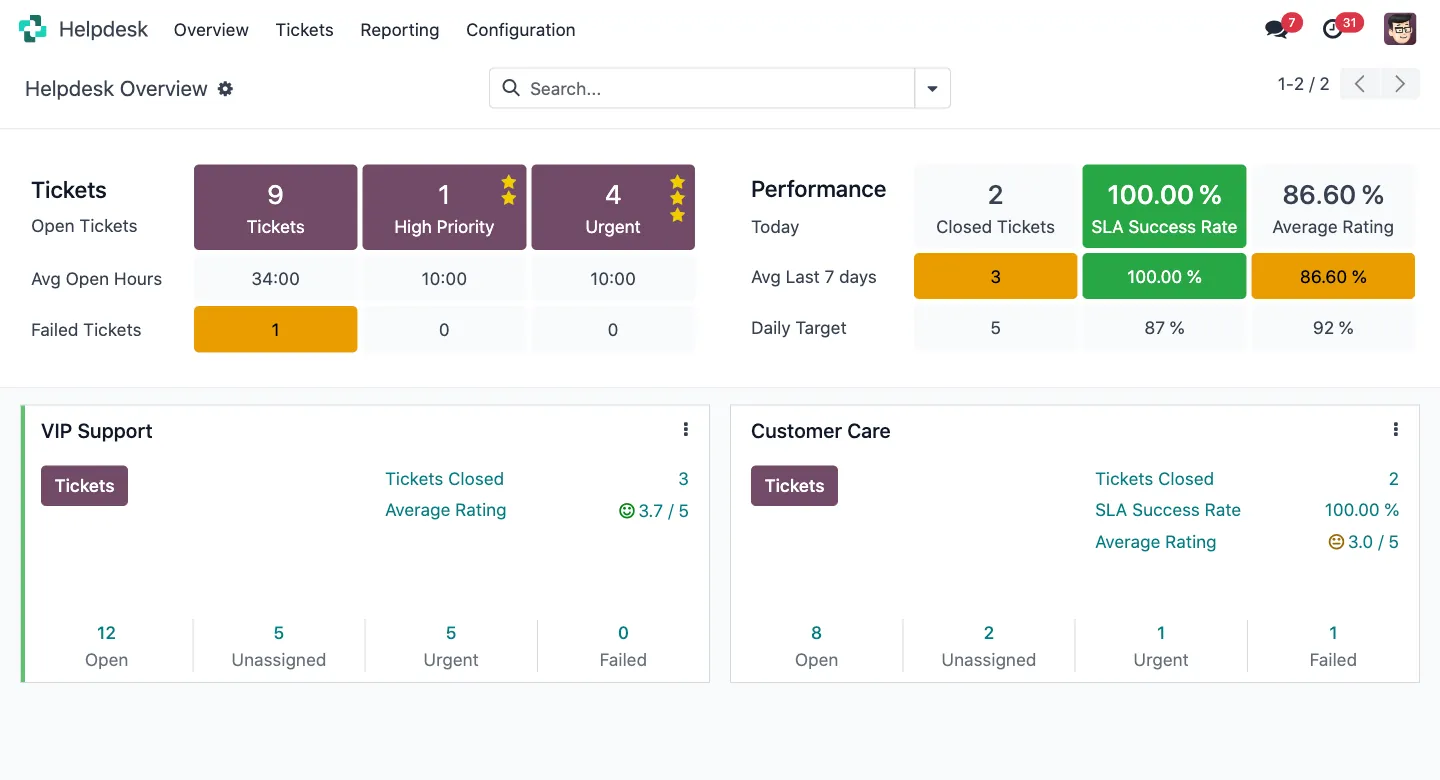
Odoo Helpdesk — Track, prioritize, and solve customer tickets.

Track, prioritize, and solve customer tickets.

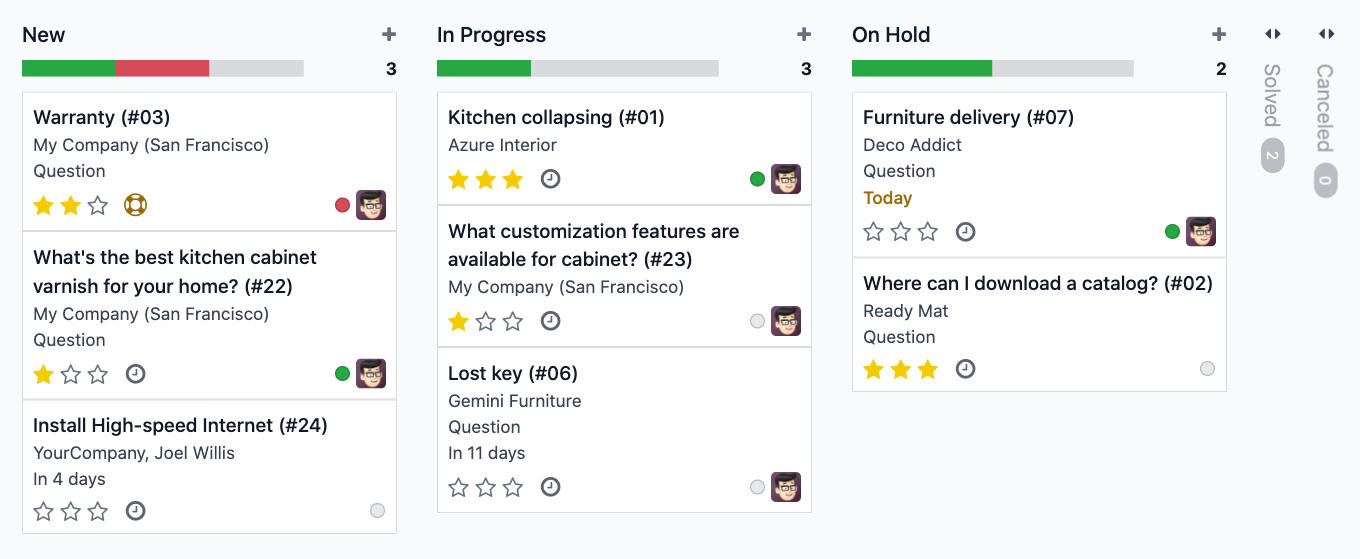
Organize your tickets the way you want with the amazing kanban view. Get an instant overview of your team's workload and check the status of a ticket based on your custom tailored SLA rules.

Multi Channels, Out-of-the-box.

New incoming emails create tickets automatically. Qualify your customers queries with a customizable website form.

  • Get in touch with your customers where they are.
  • Email
  • Website Form
  • Live Chat

Sell support contracts

Sell support contracts to automatically provide helpdesk services to your customer. Track time on each contract with the timesheet app, and upsell automatically with time-limited contracts. Create alerts for your sales or helpdesk team based on your customer status.

  • Sell, renew, and upsell easily.

Provide smarter self-service

Develop your self-service platform by directly linking your FAQ, training videos, and presentations on a ticket. Develop a community around your product with the forum.

  • Built-in customer knowledge base.

Allow customers to close their tickets

Reduce the chance of error, avoid misunderstandings and leave more time for Helpdesk Teams to worry about what truly needs their attention. Odoo is a suite of open source business apps that cover all your company needs: CRM, eCommerce, accounting, inventory, point of sale, project management, etc.

  • Grant autonomy. Improve productivity.

How we set it up for you

Helpdesk, configured to how you work.

Standard Odoo first. We set it up on a staging database, migrate your data, train your team and stay on after go-live.

  1. Discovery: we map how the process runs today and match it to the app
  2. Configuration on a staging database, checked against real records
  3. Training for the people who will use it, on your own data
  4. Support after go-live: fixes, changes and upgrades

Apps that share the same database.

All Odoo apps

Product descriptions, screenshots and videos are © Odoo S.A., reproduced for reference from odoo.com. TechNext is an Odoo Ready Partner; we implement and support Odoo.

Put Helpdesk to work for your BIR requirements.

Keep the system you run today. Our own experts add Helpdesk as a plug-in in your system and quote it in writing first.