


BIR compliance7 min read
EOPT invoice rules: what your invoice must show, and how to set it up in Odoo
The invoice replaced the OR: every field RR 7-2024 requires, the buyer-TIN rule, converted receipts and the Odoo invoice layout.
BIR noticeE-invoicing is due by 31 December 2026 for covered taxpayers, including businesses on a CAS or CBA with invoicing software.E-invoicing is due by 31 Dec 2026 for covered taxpayers.
CAS set-up in OdooAn Authority to Print (ATP) is the BIR's permission to have an accredited printer print your serially numbered invoices, and any business that issues invoices from printed booklets or pads still needs one, including businesses that keep a few booklets as back-up for their computerised system. Invoices generated by a registered CAS or POS work differently. Here is when each applies, what changed under the EOPT Act, and how Odoo fits.
Prepared by the TechNext Philippines Odoo and finance team, Taguig City.
By TechNext · · 10 min readBIR compliance
Key takeaways
Many businesses issue invoices from a system and keep a printed booklet in the drawer for the day the system goes down. The BIR treats the two differently. Under RR 7-2024, manual invoices need an Authority to Print, while a registered CAS needs an Acknowledgement Certificate for the invoices it generates. This guide explains the split as the rules stand in October 2026.
Section 238 of the Tax Code, as amended by the EOPT Act (RA 11976), says every person engaged in business must secure an authority to print from the BIR, free of charge, before a printer can print its invoices. The BIR grants it only if the invoices are serially numbered and show the name, TIN and business address of the user. Printers must keep a logbook of the taxpayers they print for, with the number of booklets and the serial numbers.
RR 18-2012 adds the operating rules that still frame the ATP:
RMO 12-2013 lists what goes at the foot of each printed invoice: the accredited printer's name, address, TIN and accreditation details, and the ATP number and date issued. Under RR 7-2024 Section 6(B.19), the bottom of a manual invoice shows the ATP number or OCN and date issued, the BIR permit number for loose-leaf invoices, and the approved serial numbers.
RR 7-2024 also sets out which authority goes with which kind of invoice: an ATP (or BIR printed invoices) for manual invoices, a Permit to Use for loose-leaf invoices plus an ATP for computer-aided invoices, and an Acknowledgement Certificate for a CAS or its components. Section 7 repeats that anyone who will use manual invoices secures an ATP before an accredited printer prints them.
The ATP application form is still BIR Form 1906, revised in October 2025 and now titled "Application for Authority to Print Invoices" (RMC 97-2025). Under RMO 12-2013 it is filed with the RDO or Large Taxpayer office that has jurisdiction over your head office. The documents listed there include a sample layout of the invoice, the printer's job order and a copy of your previous ATP. Ask your RDO for its current checklist, because requirements are updated over time.
The process has moved online. RMC 153-2022 announced that ATP applications are available in the BIR's Online Registration and Update System (ORUS) in all RDOs from 16 January 2023. Since 15 January 2024, branches can apply for their own ATP through a separate ORUS branch account (RMC 10-2024). For a new business, RR 18-2012 says the ATP is secured together with the Certificate of Registration.
RR 18-2012 made an ATP valid until the series was used up or for five years, whichever came first. RR 6-2022 removed that limit. ATP invoices and their serial numbers no longer expire, and the "valid until" date is no longer printed. RMC 123-2022 says the change took effect on 16 July 2022.
| Pre-printed ATP invoice | System-generated invoice | |
|---|---|---|
| BIR authority | ATP, applied for on Form 1906 or in ORUS | Registration of the system: Acknowledgement Certificate for a CAS or CBA, Permit to Use for a CRM or POS machine |
| Who prints it | A BIR-accredited printer | Your own registered system |
| Serial numbers | Pre-printed, as approved in the ATP | Generated by the system, at least six running digits under the CAS requirements |
| Footer | ATP number or OCN, date issued and approved serial numbers (RR 7-2024 Section 6(B.19)), plus the printer's details | CAS or CBA: PTU number or ACCN, series range and date issued (Section 6(B.21)). CRM or POS: PTU number (Section 6(B.20)) |
| Validity | Until the series is used up (RR 6-2022) | Until revoked, or until a major system change needs an updated registration |
| Typical user | Businesses that write invoices by hand, and back-up sets for systems | Businesses with a registered CAS, CRM or POS |
The choice also changes how the BIR classifies your system. Under RMO 9-2021, a CAS covers the full cycle, including system-generated invoices. If invoices are issued manually, the system is treated as a CBA. Our CAS and CBA registration guide covers that registration.
RR 7-2024 made the invoice the proof of sale for goods and services, and the official receipt became a supplementary document. RMC 77-2024 confirms that a service business switching from ORs must apply for a new ATP for invoices, and that each type of invoice (for example a cash invoice and a charge invoice) needs its own serial series.
For unused ORs, RR 11-2024 gave two options. Use them as supplementary documents stamped "THIS DOCUMENT IS NOT VALID FOR CLAIM OF INPUT TAX", or strike out "Official Receipt", stamp "Invoice" and use them until they run out. The stamping needs no RDO approval, but unused ORs to be converted into invoices had to be reported by 31 July 2024. RR 11-2024 also tells taxpayers to obtain newly printed invoices with an ATP before the converted ORs run out. RMC 77-2024 lists back-up manual ORs converted to invoices among the documents usable until fully consumed.
Systems followed different rules. CRM and POS users could rename "Official Receipt" to "Invoice" and continue the same series. A registered CAS or CBA needed a new Acknowledgement Certificate. Any system-generated "official receipt" issued for a sale after 31 December 2024, or after the reconfiguration if that came first, is not evidence of a sale. The full field list is in our EOPT invoice requirements guide.
One more change affects printed stock. RR 6-2026 adds creditable withholding tax, if applicable, as a separate item on invoices. Its transitory rule lets unused invoices be used until consumed if "Less: Withholding Tax" is stamped conspicuously on them, and newly printed invoices must reflect the phrase before use. RMC 112-2026, issued on 22 October 2026, clarifies this. According to published summaries, the withholding line is needed only on sales subject to withholding, and no new ATP is needed solely because an existing layout lacks the field. Include the line in your next ATP layout.
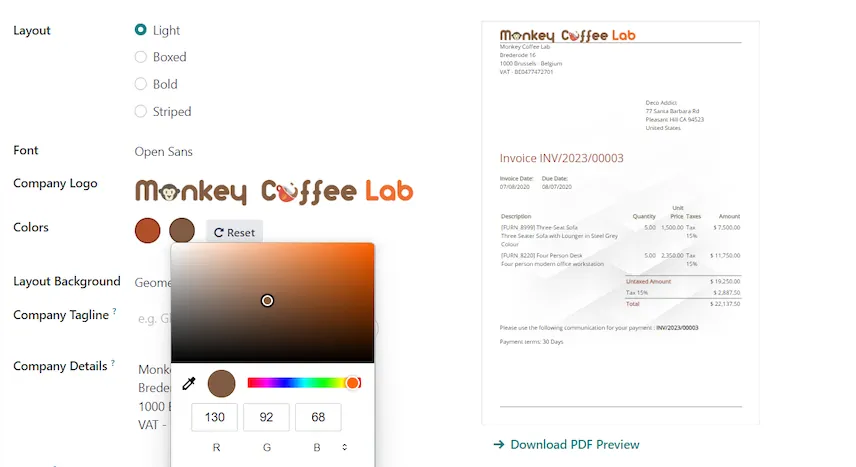
Odoo issues system-generated invoices. Registered as your CAS, it falls under the Acknowledgement Certificate route in RR 7-2024 rather than the ATP route for manual invoices. The layout is set under Settings > Companies > Configure Document Layout, where Odoo 19 lets you set the layout, logo, address, footer and the company tax ID. The BIR fields themselves need more than that:
If Odoo also runs your shop counter, the POS rules apply on top. Our POS accreditation and PTU guide explains them.
You don't need to hire your own team. A TechNext adviser reviews which of your invoices are printed and which come from a system, then our team in Taguig City sets up the Odoo invoice layout, series and back-up journal with you. You apply for the ATP and the system registration yourself. See how we set Odoo up as your CAS, or read about Odoo in the Philippines.
Rules change. This article reflects Section 238 of the Tax Code as amended by RA 11976, RR 18-2012, RMO 12-2013, RMO 9-2021, RMC 5-2021, RR 6-2022, RMC 123-2022, RMC 153-2022, RMC 10-2024, RR 7-2024, RR 11-2024, RMC 77-2024, RMC 97-2025, RR 6-2026 and RMC 98-2026, read from the BIR's documents or copies of them, and RMC 112-2026 (from published summaries), and the Odoo 19.0 documentation and Odoo 20 release notes, as available on 24 October 2026. TechNext is not affiliated with the BIR. It is not tax advice: confirm with your accountant or RDO before you act.
No. RR 6-2022 removed the five-year validity from 16 July 2022. ATP invoices can be used until the series runs out, and an old "valid until" date on unused booklets is disregarded, unless it had already passed on or before 15 July 2022.
RR 7-2024 links the ATP to manual invoices printed by an accredited printer. Invoices generated by a registered CAS come under its Acknowledgement Certificate, and a POS machine's invoices under its Permit to Use. Any invoices printed in booklets, including back-up sets, need an ATP. Covered e-invoicing taxpayers also need a Permit to Issue (RMC 98-2026).
Under RMO 9-2021, pre-printed back-up invoices with an approved ATP, set aside for downtime of a system without redundancy, should not exceed 1,000 sets at a time.
Online in ORUS, available nationwide since 16 January 2023, or at the RDO with jurisdiction over your head office using BIR Form 1906 (October 2025 version, per RMC 97-2025). Branches can apply through their own ORUS branch account.

About TechNext. TechNext Pte. Ltd. is a trusted expert adviser for ERP and compliance: an Odoo Ready Partner headquartered in Singapore, with its main development and consulting hub in Taguig City, Metro Manila and an AI engineering hub in Ho Chi Minh City. Our own experts implement Odoo end to end (discovery, configuration, data migration, training and support), set up with the Philippine (BIR) and Singapore (GST) localisations, for clients in 25+ countries. We are not affiliated with, accredited by or acting for the BIR or any government agency, and we do not file or register on your behalf. About us · Get a quotation
The invoice replaced the OR: every field RR 7-2024 requires, the buyer-TIN rule, converted receipts and the Odoo invoice layout.
CAS vs CBA, the Acknowledgement Certificate, the documents the BIR asks for, and how the e-invoicing PTI fits on top.
Accreditation of the POS software vs the Permit to Use for each machine, the eAccReg steps, receipt fields, Z-readings, PTU cancellation and where Odoo Point of Sale fits.
TechNext sets up your Odoo, can build your website and brand on it, and stays on after go-live, in Singapore and the Philippines. An adviser reviews your situation first.